

When most businesses and schools invest in a new website, they focus on the design, content and functionality. Naturally, because that’s what everyone sees.
What often gets overlooked is the technical setup behind the scenes. Yet a poorly configured DNS record can cause just as many problems as a poorly designed website.
Recently, while configuring a website for a client, we were reviewing their Cloudflare settings and found several DNS records configured incorrectly. The website was working, but there was a risk that email services and other important systems could stop functioning properly.
It’s a common issue, and one that highlights why professional website setup involves much more than simply building web pages.
What Is DNS?
DNS (Domain Name System) is often described as the internet’s phone book.
When someone types:
www.yourschool.co.uk
or
www.yourbusiness.co.uk
into their browser, DNS tells their computer where to find the website by converting the website address into an IP address.
Without DNS, websites wouldn’t load, emails wouldn’t arrive and your laptop would probably get thrown out of the nearest window.
Like your Wifi, most people never need to think about how DNS works until it doesn’t.
Understanding Cloudflare’s Orange and Grey Clouds
Cloudflare has become one of the most popular platforms for website security, performance and protection.
Within Cloudflare, each DNS record can be configured in one of two ways:
Proxied (Orange Cloud)
DNS Only (Grey Cloud)
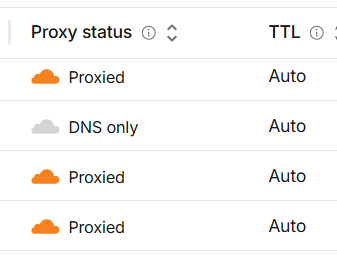
At first glance they seem like a small setting, but choosing the wrong option can create unexpected problems.
What Does “Proxied” Mean?
When a DNS record is set to Proxied (Orange Cloud), visitors don’t connect directly to your website server.
Instead, their traffic passes through Cloudflare first.
Cloudflare then forwards the request to your web server and sends the response back to the visitor.
This allows Cloudflare to provide:
✅ DDoS protection
✅ Website security filtering
✅ Performance optimisation
✅ Global content caching
✅ SSL management
✅ Hiding your server’s real IP address
For most websites, this is exactly what you want.
The Receptionist Analogy
Imagine your business or school has a reception desk.
Without Cloudflare, visitors walk straight through the front door and directly to the person they want to visit.
With Cloudflare’s proxy service enabled, every visitor first speaks to the receptionist.
The receptionist:
- Checks who they are.
- Turns away people you can’t be bothered to speak to!
- Provides directions.
- Handles routine questions.
- Makes the whole building run more efficiently.
Only then are legitimate visitors allowed through.
That receptionist is Cloudflare.
It’s protecting your website, filtering malicious traffic and helping everything run smoothly.
What Does “DNS Only” Mean?
When a record is configured as DNS Only (Grey Cloud), Cloudflare simply provides the address of the destination server and then steps out of the way.
Traffic flows directly between the visitor and the server.
Think of it as giving someone the office address without sending them via reception first.
There is nothing wrong with this approach. In fact, it’s essential for many services.
When Should You Use DNS Only?
Certain services need a direct connection and generally shouldn’t pass through Cloudflare’s proxy.
Examples include:
- Microsoft 365 email
- SMTP mail services
- IMAP and POP3 email clients
- VPN connections
- FTP services
- Remote access systems
- Certain specialist applications
For example:
mail.yourdomain.co.uk should usually be DNS Only.
vpn.yourdomain.co.uk should usually be DNS Only.
ftp.yourdomain.co.uk should usually be DNS Only.
If these services are accidentally proxied, they may stop working.
The Most Common Problem We See
One of the most common issues we encounter is email problems following website changes.
A business owner commissions a new website, someone updates the DNS records and everything appears fine.
The website loads perfectly.
Then a few days later:
- Emails stop arriving
- Staff can’t access Outlook
- Online services fail
- Nobody knows why
In many cases, the cause is a simple DNS configuration error.
The website records should have been proxied, while the email records should have been left as DNS Only.
It’s a small technical detail, but it can have a huge impact.
Why This Matters for Schools and Small Businesses
If you’re running a school, charity or small business, you probably don’t want to spend your time learning the difference between:
- A Records
- CNAME Records
- MX Records
- TXT Records
- Proxied Records
- DNS Only Records
You simply want:
✅ A website that works
✅ Emails that arrive
✅ Fast page loading
✅ Good security
✅ Reliable support when you need it
That’s exactly where professional website management makes a difference.
Why Our Clients Choose Click & Simple
When we build or manage a website, we’re not just creating web pages.
We also take responsibility for the technical infrastructure that keeps everything running smoothly.
That includes:
✅ Domain registration and management
✅ Cloudflare setup and optimisation
✅ DNS configuration
✅ Website hosting
✅ SSL certificates
✅ Microsoft 365 integration
✅ Email configuration
✅ Ongoing IT support
Whether we’re building a new website for a school, a tradesperson, a retailer, a professional services company or a local organisation, we make sure everything is configured correctly behind the scenes.
Our clients don’t need to care what colour a cloud is.
They don’t need to worry about why their website isn’t loading or why emails have stopped arriving.
They simply know that everything works as it should.
Let Us Handle the Technical Stuff
A great website isn’t just about design.
It’s about making sure every piece of technology behind the scenes is properly configured, secured and maintained.
At Click & Simple, we combine website design, IT support and technical expertise to deliver websites that not only look professional, but work reliably every day.
If you’re a small business or school looking for a new website, we’ll take care of everything from the design and hosting to the DNS, email and security setup, leaving you free to focus on what you do best.
Want a website that’s backed by real IT expertise? Get in touch with Click & Simple today!