

Have you ever noticed your internet works perfectly when only a few people are online, but becomes frustratingly slow when everyone connects at once?
Websites take longer to load, video calls start lagging and downloads crawl.
If you’re wondering why WiFi slows down with more users, the answer is simple: WiFi is a shared resource. The more devices connected to the same network, the more they compete for bandwidth and signal.
Let’s break down why this happens and what you can do about it.
1. WiFi Is Shared Between All Devices
Your WiFi network works a bit like a single-lane road.
When only a few cars are on the road, traffic moves quickly. But when the road fills with cars, everything slows down.
The same thing happens with WiFi. Every connected device – laptops, phones, tablets, smart TVs – shares the same wireless network.
As more devices connect, each one has to wait its turn to send and receive data. This reduces the speed available to everyone on the network.
2. Your Internet Bandwidth Gets Split
Your internet connection has a maximum speed provided by your internet service provider.
For example, if your connection is 100 Mbps:
- 2 devices might each get around 50 Mbps
- 10 devices might get closer to 10 Mbps each
In reality the distribution isn’t perfectly even, but the principle is the same: more users mean less bandwidth per device.
Activities that use a lot of data include:
- Video calls (Zoom, Teams, Google Meet)
- Streaming video
- Listening to internet radio
- Cloud backups
- Large file downloads
- Software updates
If several people are doing these activities at the same time, the network slows down quickly.
3. Many Devices Are Active in the Background
Even when you’re not actively using the internet, many devices still send and receive data.
Examples include:
- Phones backing up photos
- Computers downloading updates
- Cloud storage syncing files
- Apps refreshing notifications
These background processes quietly consume bandwidth and contribute to network congestion.
4. One Person Often Connects Multiple Devices
In many homes and offices, each person connects several devices to WiFi.
A single user might connect:
- A laptop
- A smartphone
- A tablet
- A smartwatch
In a 20-person office, that can easily mean 50 or more connected devices sharing the same wireless network.
The more devices there are, the more traffic the network must handle.
5. Older Routers Struggle With Many Devices
Many routers – especially older or consumer models – aren’t designed to handle dozens of devices at once.
When too many devices connect, the router can become overloaded trying to manage them.
This can cause:
- Slower internet speeds
- Intermittent disconnections
- Lag during video calls or streaming
Upgrading to a modern router (especially one that supports WiFi 6) can significantly improve performance in busy environments.
6. Weak WiFi Signals Can Slow Everything Down
Distance from the router also affects WiFi performance.
When devices are far away or separated by walls, the signal becomes weaker. Devices with weak signals transmit data more slowly, which can slow down the entire network.
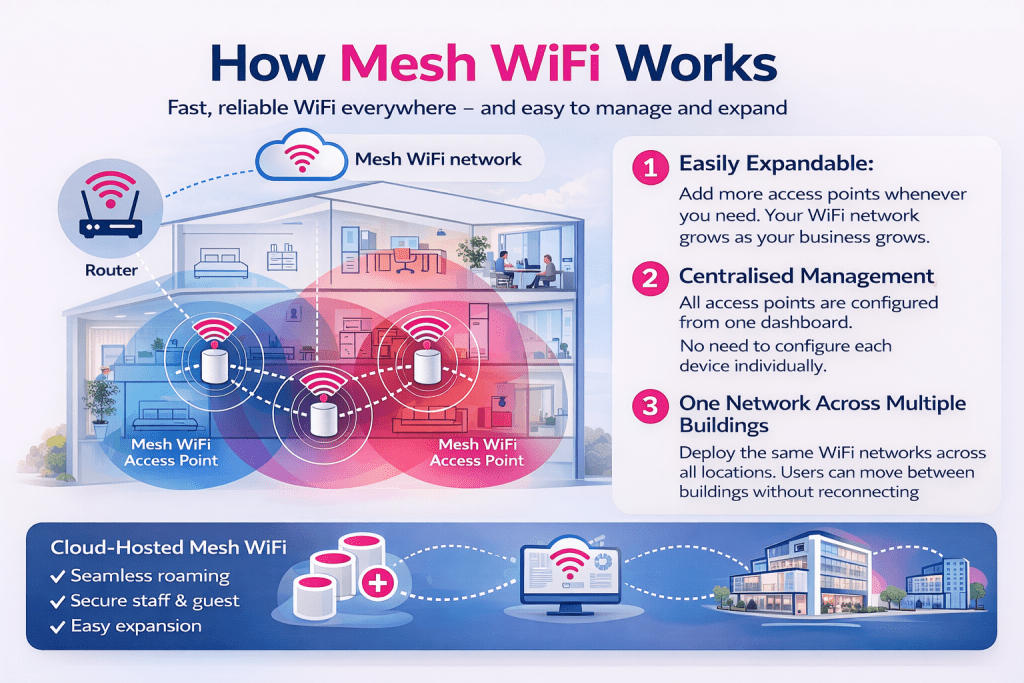
Large homes or offices often benefit from multiple access points or mesh WiFi systems to ensure consistent coverage.
How to Fix Slow WiFi When Many Devices Are Connected
If your WiFi slows down when multiple users connect, there are several ways to improve performance:
1. Upgrade your router
Newer routers handle more devices efficiently.
2. Use mesh WiFi or additional access points
This improves coverage in larger spaces.
3. Move the router to a central location
Avoid hiding it in cupboards or corners.
4. Limit bandwidth-heavy activities during peak times
Large downloads and backups can slow the network.
5. Separate guest networks
This prevents visitors from using your main network bandwidth.

Frequently Asked Questions
Why does WiFi slow down when more devices connect?
WiFi slows down because all connected devices share the same network bandwidth. As more devices join the network, each device receives a smaller share of the available speed.
How many devices can a WiFi router handle?
Most basic home routers work best with around 10–20 devices. Modern routers designed for busy homes or small businesses can support 50 or more devices.
Does upgrading internet speed fix slow WiFi?
Sometimes – but not always. If the slowdown is caused by router limitations, signal coverage or too many devices, upgrading your internet plan alone may not solve the problem.
Final Thoughts
WiFi slows down with more users because every device connected to the network shares the same bandwidth and wireless signal.
As the number of devices increases, the network becomes busier, and performance can drop.
The good news is that we provide hosted mesh WiFi networks designed specifically for busy workplaces. Instead of relying on a single router, mesh WiFi uses multiple access points placed around your office to deliver strong, consistent coverage everywhere. We can even bridge your WiFi from one building to another!
We also separate guest and employee networks, keeping your business systems secure while still allowing visitors to connect easily.
Best of all, our solutions are affordable, scalable and fully managed, so you don’t have to worry about maintaining the network yourself. It just works